
My book was sent back. What do I change?
Our reviewer's note tells you what to change, and only the format we sent back needs fixing. Make the change, then select Resubmit for review and the book goes back into the queue.
Steps
- Open the email we sent and select View feedback. Or go to My manuscripts and select the red Fix button on your book, for example Fix eBook.
- Read the note at the top, under Changes needed before we can publish. Our reviewer's words follow "Our reviewer says".
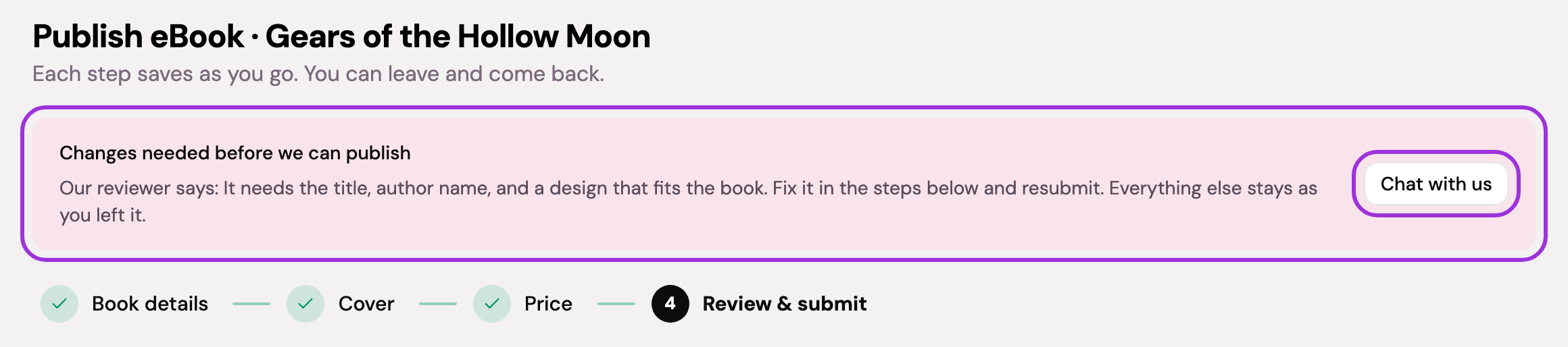
- Make the change where it belongs:
- Text or layout of a book you wrote here. Open it in Creator Studio, fix it there, and preview it.
- A file you uploaded. Correct it on your computer, export a new EPUB or PDF, and replace it in the Your file step.
- Cover. Go to the Cover step and redesign it with Design it here, or upload a corrected file.
- Details or price. Edit them in Book details or Price.
- Go to Review & submit, select Resubmit for review, then Yes, resubmit.
Everything you didn't change stays as you left it. Your other formats keep their own status.
If something goes wrong
- The note doesn't say where the problem is. Select Chat with us next to the note and we'll point you to the exact page or element.
- We asked you to prove you hold the rights. Reply to our email with proof, such as confirmation that you're the original author or a licence to publish. See Who owns the rights to my book?
- We said the ISBN you entered isn't valid. We remove it, so enter a correct one when you resubmit. See Do I need an ISBN?
- We said the language isn't supported. We can't publish that version yet. See Which languages can I publish in?
Related
- How long does review take, and what do we check?
- My preview looks wrong. How do I fix it?
- What do my cover files need?
Still stuck? Message us from the chat bubble and we'll help.
Updated on: 23/11/2026
Thank you!