
How do I unpublish or remove a book?
You can take a whole book off sale yourself by archiving its manuscript. Archiving is permanent, so if you only want one format taken down, message us instead.
Before you start
- Only the manuscript's owner can archive it.
- You can't archive while any format is in review. Withdraw it first. See Can I withdraw my book from review?
- Archiving can't be undone. To sell the book again you'd create a new manuscript and submit it for review.
Steps
- Go to My manuscripts and find the book.
- Select the three-dot menu at the end of its row, then Archive.
- If the book is on sale, check the list of editions that will come off sale and type the book's title to confirm.
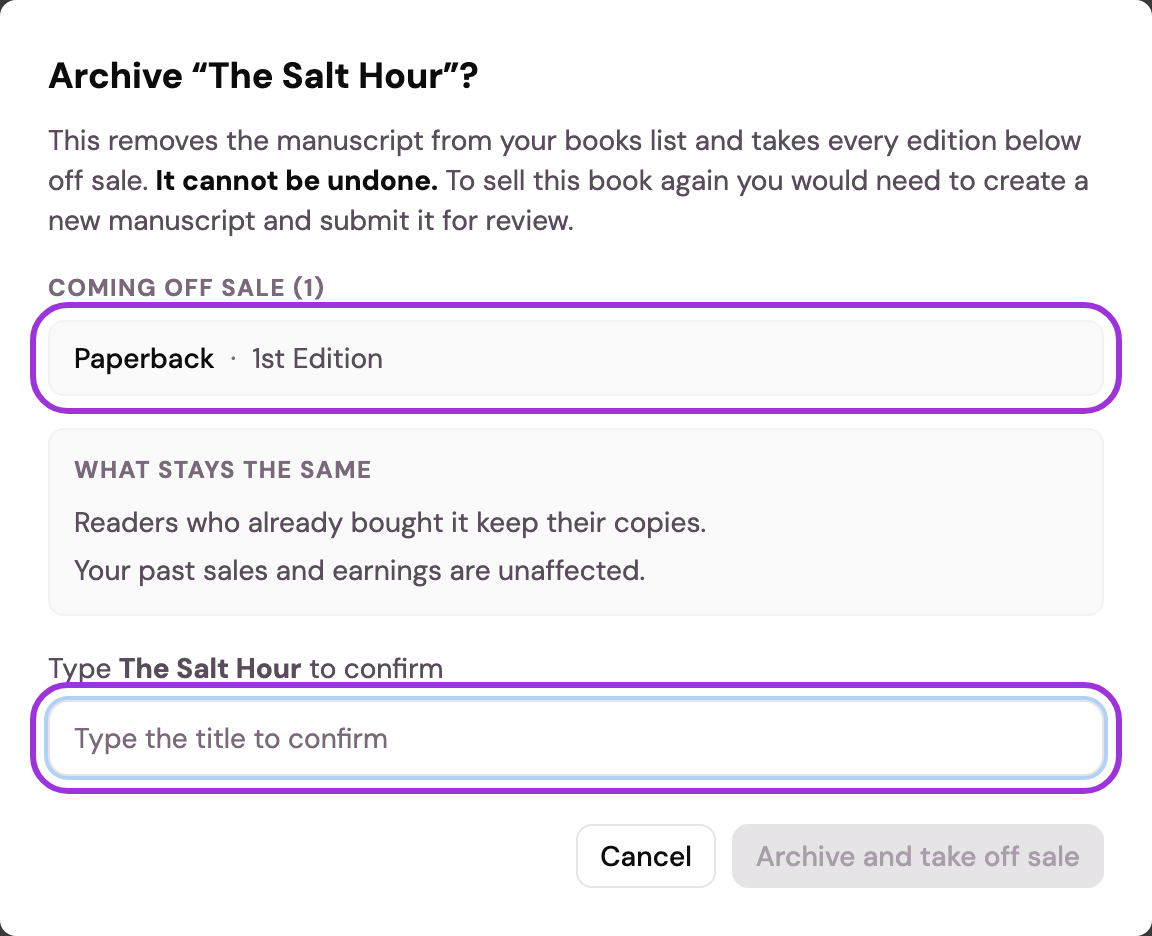
- Select Archive and take off sale. If nothing is on sale yet, the button just says Archive.
What happens next
- Every edition comes off sale on PubliRead.
- Readers who already bought it keep their copies.
- Your past sales and earnings are unaffected.
- The manuscript leaves your main list. Switch My manuscripts to the Archived view to find it, and you can still open it in Creator Studio.
Archiving also works for a draft you never published, such as a duplicate.
If something goes wrong
- Archive is greyed out. A format is in review. Withdraw it from review, then archive.
- You only want one format off sale, such as a PDF you published by mistake. Message us with the book title and the format, and we'll take it down for you.
- You want to change the book, not remove it. Archiving is the wrong tool. See Can I update my book after publishing?
- You want to close your whole account. See How do I delete my account?
Related
- Can I withdraw my book from review?
- Can I update my book after publishing?
- How do I delete my account?
Still stuck? Message us from the chat bubble and we'll help.
Updated on: 23/11/2026
Thank you!