
Can I withdraw my book from review?
Yes, as long as our reviewer hasn't finished with it yet. Withdrawing turns the format back into a draft with everything you added kept, so you can make your changes and submit again.
Before you start
- Only the manuscript's owner can withdraw it. Co-authors and editors can't.
- You withdraw one format at a time. Other formats of the same book stay where they are.
Steps
- Go to My manuscripts and find the book.
- Select the three-dot menu at the end of its row, then Withdraw eBook from review. The menu names the format, such as Withdraw Paperback from review.
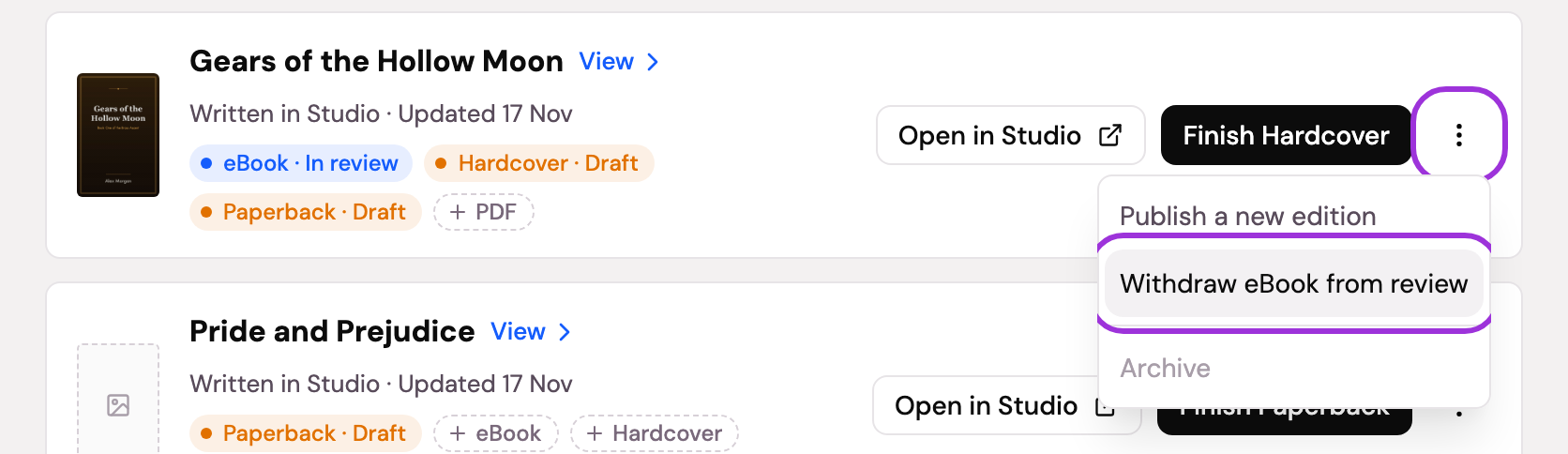
- In Take this book out of review?, tell us why if you like. This is optional.
- Select Withdraw from review.
You can also open the submission and select Withdraw from review in the In review note at the top.
The format is back in your drafts. Make your changes, then select Submit for review again. It rejoins the review queue when you do.
If something goes wrong
- "This submission has already been reviewed, so it can't be withdrawn." Our reviewer finished first. Refresh the page to see whether it went live or came back with changes. If it's live and you want it off sale, see How do I unpublish or remove a book?
- "We're still preparing your book for review." We're still building the file you submitted. Try again in a minute.
- The withdraw option isn't in the menu. You aren't the owner, the format isn't in review any more, or we're still preparing the file you just submitted.
Related
- How long does review take, and what do we check?
- How do I unpublish or remove a book?
- Can I update my book after publishing?
Still stuck? Message us from the chat bubble and we'll help.
Updated on: 23/11/2026
Thank you!