
How do I work with an editor or co-author?
Invite your editor or co-author from Creator Studio with their email address, and choose whether they can write in the book or only read and comment. They join with a free account, and you can then comment on passages and write in the same chapter at the same time.
Before you start
- Only the book's owner can invite people, change roles or remove someone.
- Your collaborators don't need a paid plan. Your plan sets how many people can join each book, and pending invitations count towards that number. See our pricing page for the limit on each plan.

Prefer to watch? This short video guide walks through every step.
Steps
- In Creator Studio, click the plus beside the avatars in the header. Hover over it and it reads Invite collaborators.
- Type their email address and choose a role:
- Editor or Author: can write in the book and leave comments.
- Viewer: can read the book and leave comments, but can't change the text.
- Click Invite.
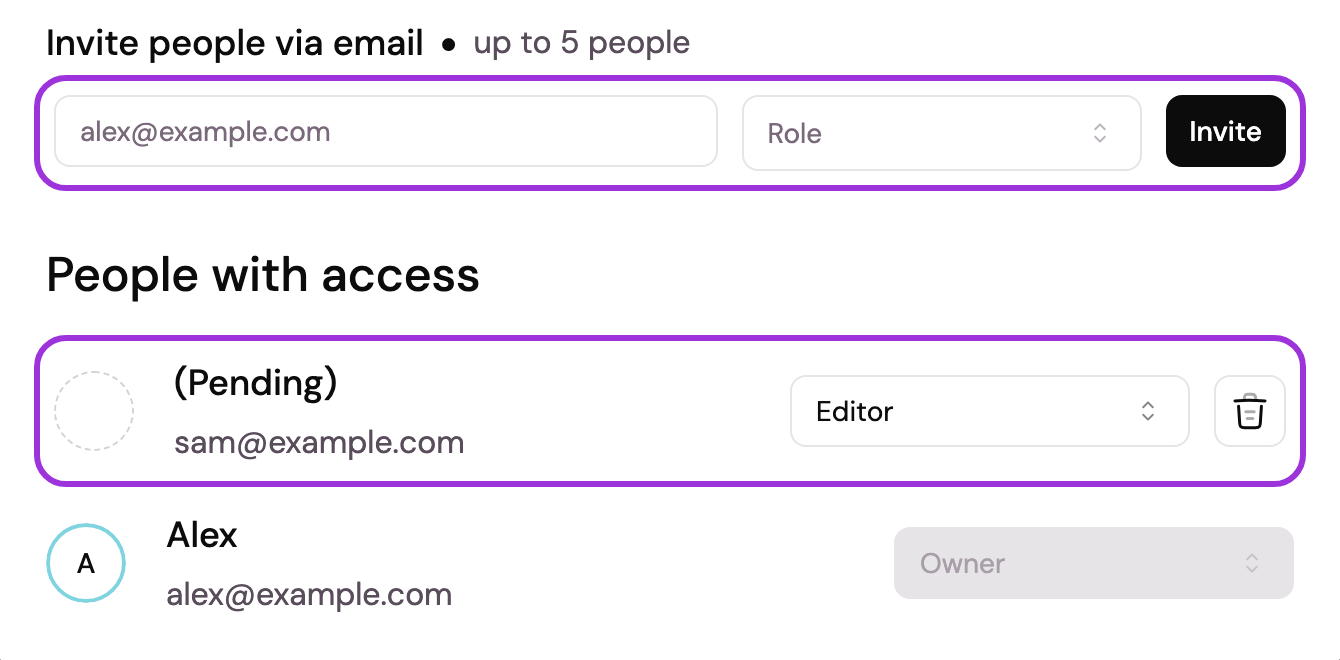
- If they already have a PubliWrite account, they're added straight away and we email them to say so.
- If they don't, they show as (Pending) and we email them an invitation. Once they create a free account with that same address, the book appears on their dashboard.
- To comment, select a passage and click Comment in the toolbar. Your note stays pinned to those words.
- Open Comments in the right bar to read notes. Click Reply to answer, and Mark as resolved when it's dealt with.
- To change someone's role, open the invite window again and pick a new role beside their name. To remove them, click the bin icon beside their name and confirm.
If a co-author should earn from the book, give them the Author role and set the earnings split before you publish.
If something goes wrong
- They never got the email. Check the address in the invite window and ask them to look in their spam folder. To send it again, click the bin icon to cancel the pending invitation, then invite them again.
- They signed up but can't see the book. They need to create their account with exactly the address you invited. If they used another one, cancel the invitation and invite the address they signed up with.
- They can't type in the book. They're a Viewer. Change their role to Editor or Author.
- You can't invite anyone else. You've reached your plan's limit for this book. Remove someone, cancel a pending invitation, or click See plans in the invite window.
- There's no plus in the header. You're not the book's owner. Ask the owner to invite the person.
Related
- How do I restore an earlier version?
- How do I split royalties with a co-author?
- How do I write and organise my book?
Still stuck? Message us from the chat bubble and we'll help.
Updated on: 23/11/2026
Thank you!