
How do I split royalties with a co-author?
If your book has co-authors, you set each person's share in the Price step before you publish, and the shares must add up to 100%. After each sale, we credit every co-author's share to their own balance automatically, and each of you withdraws your own earnings.
Before you start
- You need to own the book. Only the owner can set the split.
- Each co-author must have joined the book with the Author role. Invite them from the editor: see How do I work with an editor or co-author?
- The split is for paid books. If you switch on Free for readers, the split is hidden because there's nothing to divide.
Steps
- Open the publish flow for the format you're publishing and go to the Price step.
- Enter your price. Below it, the Royalty split section has a row for You and one for each co-author.
- Type each person's Share as a percentage. The shares start out equal. Once your price is valid, the Per sale column shows roughly what each share earns.
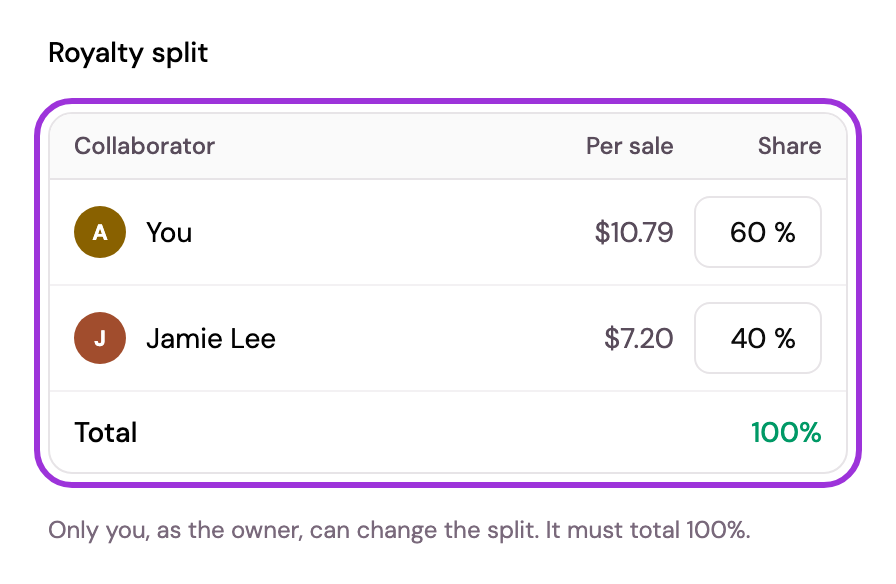
- Check the line under Total. It tells you how much is left to share out, or how much too much you've given, until it reaches 100%.
- Click Continue and carry on publishing.
Each format has its own Price step, so set the split for every format you publish.
How the split is worked out
For print, the print cost comes off the sale price first. What's left is divided by your shares, then each person's own plan rate applies to their part. If you're on Authorpreneur and your co-author is on the Free plan, your part is worked out at 95% and theirs at 80%. The Per sale column uses your plan rate for everyone, so a co-author on a different plan will earn a different amount from the one shown.
If something goes wrong
- The Royalty split section doesn't appear. Check that Free for readers is off, that your co-author has joined, and that their role is Author, not Editor or Viewer.
- You're a co-author and can't set the split. The book's menu tells you only the owner can set royalty splits. Ask the owner to set them.
- "It must total 100%." Change the shares until Total reads 100%.
- You need to change the split on a live book. You can't change a live split yourself. Message us with the book and the new shares.
- Your co-author can't withdraw. They need to set up payouts in their own account: see How do I verify my identity?
Related
Still stuck? Message us from the chat bubble and we'll help.
Updated on: 23/11/2026
Thank you!