
Why is my balance still pending?
We hold each sale for 45 days, until the reader refund window has closed. Until then its earnings show as Clearing, and your Earnings page tells you the date they become yours to withdraw.
Steps
- Open Earnings under Money in the menu on the left.
- Look at the Clearing tile at the top. Its note shows the next amount to clear and its date.
- Scroll down to When you can withdraw your recent sales. Each row shows a book and format, the amount, and the date it's "available from".
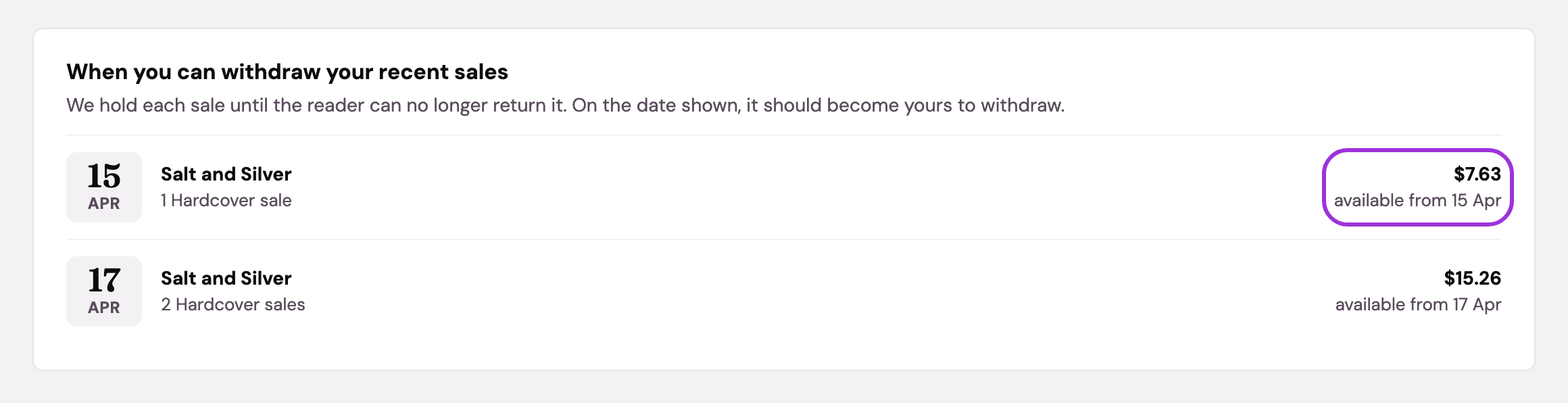
- On that date, the amount moves to Available now and you can withdraw it.
Verifying your identity doesn't shorten the hold, and not verifying doesn't extend it. Verification only matters when you withdraw, so you can set up payouts while your sales clear.
If a reader returns a book during the hold, that sale's earnings come off your Clearing figure.
If something goes wrong
- The date has passed and the sale is still clearing. Message us with the book and the sale date, and we'll check it.
- Money is under Available now but you can't withdraw it. Finish your payout setup: see How do I verify my identity?
- Your balance dropped or disappeared and you didn't withdraw. Message us straight away. Check Payout history first, so you can tell us whether a withdrawal is listed.
- "Release dates are not available right now." We couldn't load the dates this time. Refresh the page in a few minutes.
Related
Still stuck? Message us from the chat bubble and we'll help.
Updated on: 23/11/2026
Thank you!