
My book is live. How do I find readers?
Once your book is live, readers can find it on PubliRead through search and categories. To reach your own readers, share your book link, give them a home on your author website and keep in touch with a newsletter.
Steps
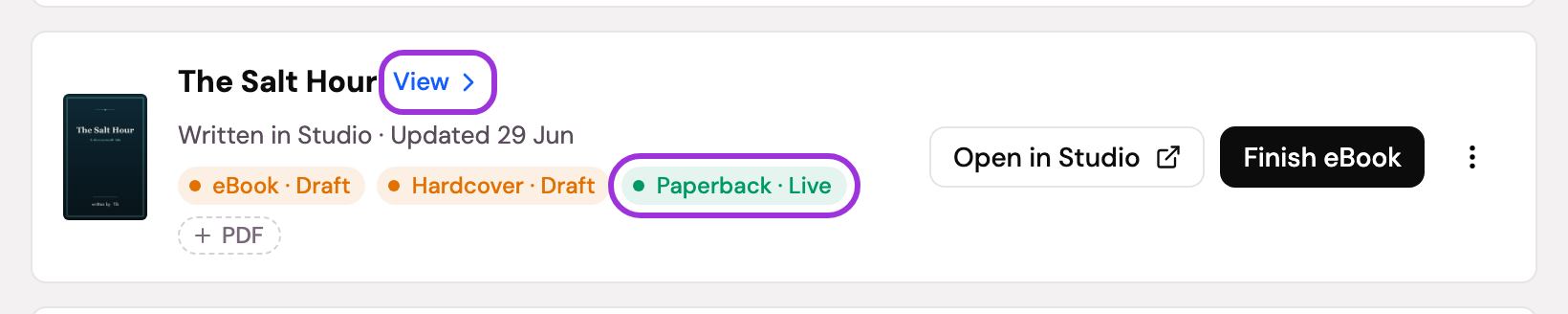
- Get your book link. Open My manuscripts, find your book and click View next to its title. The link appears once a format is marked Live. This opens your book page on PubliRead in a new tab. Copy the address from your browser and share it wherever your readers are. Readers can buy without creating an account.
- Complete your author page. Open Pen names and add a bio, a photo and links. Each pen name gets its own author page on PubliRead.
- Build your author website. Books you've published with us appear on it, each with a Buy button, and readers pay on your website. See How do I build an author website?
- Collect sign-ups and send a newsletter. Buyers can join your list at checkout, and a sign-up form on your website lets every visitor join. See How do I send a newsletter?
- Ask for honest reviews. Any reader signed in to PubliRead can review your book, and buyers get a verified purchase badge. Send early readers your book link and ask for an honest opinion. Never pay for reviews or ask for a particular rating.
- Bring copies to events. Order print copies for launches, signings or giveaways from Author copies. See How do I order author copies?
- Sell in other shops too. You can keep selling on PubliRead while you list your book with other retailers. We don't list it for you. See Can I sell my book on Amazon too?
- See what works. Analytics, under Website in the menu, shows the visitors, buy clicks and orders on your author website. Your sales show under Earnings.
If something goes wrong
- Nobody has bought your book yet. Share your link in more places, and check that your cover and description tell readers what the book is. To change a live book, publish a new edition. See Can I update my book after publishing?
- A reader says your book page won't load. Ask them for a screenshot and the link they used, then message us. See A page won't load. How do I report it?
- Your book doesn't show on your website. Check it's switched on under Books in the website builder, then publish your website again.
Related
- How do I build an author website?
- How do I send a newsletter?
- How do I order author copies?
- Can I sell my book on Amazon too?
Still stuck? Message us from the chat bubble and we'll help.
Updated on: 23/11/2026
Thank you!