
I can't open a book I bought
Your book is in one of two places: your Library, if you were signed in when you bought it, or the order page we emailed you, if you bought as a guest. Check both below, and don't pay a second time.
Find your book
- Bought without signing in? Your book isn't in a Library. It's on the order page we emailed you, so search your inbox, including spam, for the email from PubliRead.
- Can't find the email? Go to Find your order, enter the email address you ordered with and choose Email my order links. We email the order links for the eBooks and PDFs bought with that address.
- Bought while signed in? Open your avatar menu and choose Library. If the book isn't there, sign out and check any other email address you might have used.
If something goes wrong
- Your order page says "Confirming payment". This usually takes a few seconds, and the page updates by itself. Don't pay again while we check. If nothing changes within an hour, email info@publiread.com with your order number.
- Your order page says "We couldn't complete your payment". Your book isn't available yet. Choose Return to checkout to try again. If your bank shows the payment, don't pay again: email info@publiread.com with your order number and we'll check it.
- Your order page says the book was cancelled or refunded. It can no longer be opened from that page. If that's not right, email info@publiread.com with your order number.
- Your PDF doesn't open in our reader. PDFs are downloaded instead. Tap the book in your Library, or Download PDF on your order page, then open the file on your device.
- Send to Kobo isn't offered. Kobo takes eBooks only. Download a PDF and copy it to your Kobo instead.
- You bought a Paperback or Hardcover. Printed books can't be read online. We print and post them, and signed-in readers can find the order under Order history.
- Your book never reached your Kindle. Four things to check:
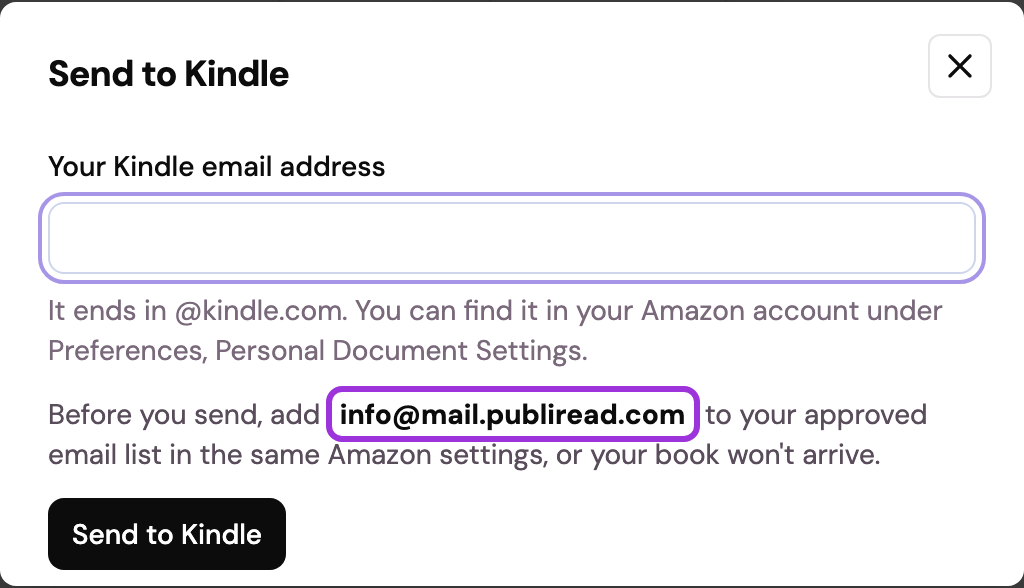
- You entered your Kindle address, which ends in @kindle.com. It's in your Amazon account under Preferences, then Personal Document Settings.
- You added the sender address we show on the form to your approved email list in the same Amazon settings. Without that, the book won't arrive.
- The file is 25 MB or smaller. Larger files can't be emailed, so download the book and add it with Amazon's Send to Kindle instead.
- You've sent it fewer than 5 times today. That's the daily limit.
Related
Still stuck? Message us from the chat bubble and we'll help.
Updated on: 23/11/2026
Thank you!